Just another technology enthusiast

Archive for the ‘Integration’ Category

XML debatching without custom pipeline

Everybody knows that you need to use a custom pipeline to debatch an XML file, where you use a custom XML disassembler pipeline component to specify the Envelop schema and Document schema.

Well, you can do it with the built-in XMLReceive pipeline as well, provided you don’t require advanced features like preserving header information, ‘Recoverable interchange processing’ or validating document structure  etc.

Do the following:

1. Create and deploy an envelope schema (Set the Body XPath property of the root node to the appropriate record in the envelope schema)

2. Create and deploy the document schema

3. Make sure the message you are receiving is an instance of the envelope schema

4. Make sure that the namespace and root node name of the document schema aligns with the MessageType of the debatched message (you may have to set the ‘Element FormDefault’ property of the Envelope schema to ‘Qualified’)

All of the above are something that you will anyway make sure even when using a custom pipeline, so nothing new.

XLANG/s is not C# (Dos and Don’t / Difference between XLANG/s and C#)

It is normal to find people who are new to BizTalk, writing expressions just like they do in C# programming language, well this works most of the time, it is when it doesn’t work that you start wondering what is wrong, and end up wasting a lot of time figuring out the problem and some more time finding the solution.

BizTalk uses a language called XLANG/s which is suitable for expressing the process flow (Just like BPEL) and resembles C# syntax when writing expressions, but it is not C# you are using there.

One does not usually get to learn the complete XLANG/s syntax as we construct the orchestration visually by dropping and configuring shapes on to the orchestration surface. You can however see the XLANG/s if you open the orchestration in a text editor like Notepad.

Here is a nice blog post by Charles Young mentioning list of things that are supported in BizTalk. http://geekswithblogs.net/cyoung/articles/3820.aspx

New in BizTalk 2006

When I do corporate training, I always get asked this question… “So what is new in BizTalk 2006 when compared to BizTalk 2004?” mostly from people who have been using BizTalk 2004. So here I have tried to summarize some of the things. Note this is by no means an exhaustive listing as there are other small but significant improvements.

SETUP

Automatic installation of redistributable components. In BizTalk Server 2006, the BizTalk team provide a single file that contains the latest version of all redistributable components required by BizTalk Server during installation, eliminating the need for users to individually search for the components.

Simplified setup experience for first-time users. BizTalk Server 2006 includes a significantly simpler installation experience for the developer, single machine user, and the first time user. Selecting to install the product by using the default setting will allow all of the product’s components to be installed under a single account on one machine, with minimal need of user input.

Flexible setup experience for advanced users. In BizTalk Server 2006, the setup experience has been redesigned to provide greater flexibility to support the advanced user tasked with deploying solutions across large server farm. Once installation completes, the custom configurations can be exported and imported to ease the installation of settings across server farms or development build labs.

Seamless upgrade experience. Upgrading from BizTalk Server 2004 to BizTalk Server 2006 is an in-place upgrade process. When a customer executes the BizTalk Server 2006 setup on a machine where BizTalk Server 2004 is already installed, the setup program will automatically upgrade the installation to BizTalk Server 2006. All solutions built for this earlier version will work unchanged in the new version.

OPERATIONS

Introducing the application concept BizTalk Server 2006 formalizes the concept of a BizTalk application by providing a logical container for housing all the artifacts for a given solution. This allows administrators to work with a complete BizTalk application as a unit, greatly simplifying the management, troubleshooting, and deployment of business processes.

Orchestration ZoomingIn BizTalk 2004, working with complex orchestrations in the Orchestration Designer sometimes requires a lot of scrolling on the design surface to view different parts of the orchestration. In BizTalk Server 2006, the designer has been enhanced to provide the ability to zoom in and out on an orchestration, allowing a developer to view only those parts of an orchestration of current interest.

Flat File Schema Wizard The BizTalk Flat File Schema Wizard is designed to simplify the process of creating flat file schemas by providing the following:

  • The ability to use flat file instances as input
  • A visual design surface for working with delimited and positional flat file schemas
  • An interactive wizard-based process for adding elements to the schema and defining flat file related annotations.

Application packagingUsing the BizTalk Administration Console, an administrator can package entire applications into .msi files by just right-clicking on the application and exporting as .msi file. Once packaged, installing these applications to one or more servers is as easy as running / importing the .msi file.

More Powerful Administration Console In BizTalk Server 2006, all the management functionality is consolidated into the BizTalk Administration Console. Users now have the ability to create artifacts and messaging components by using the console in addition to configuring, deploying, stopping, and starting applications across multiple servers.

Server health monitoring Using the BizTalk Administration Console’s Group Hub page, an administrator can view at a glance the health of currently running BizTalk applications. Rather than requiring an administrator to search for problems, the Group Hub page uses color-coded indicators to display those problems, allowing the administrators to take a more proactive approach to application monitoring.

ADAPTERS

POP3 AdapterBizTalk Server 2004 provides support for sending email through the SMTP adapter, however, no out-of-the-box support is provided for receiving email. With the introduction of the POP3 adapter in BizTalk Server 2006, BizTalk Server now supports receiving email messages and their attachments using version three of the Post Office Protocol (POP3) from any POP3 compliant mail server.

Windows SharePoint Services Adapter BizTalk Server 2006 introduces the Windows SharePoint Services Adapter to provide built-in support for accessing and publishing documents stored in Windows SharePoint Services document libraries. Organizations can now link the Office documents and tools familiar to knowledge workers with the enterprise portal systems that run their businesses.

MQ Series Adapter For BizTalk Server 2004 the MQSeries adapter was available as a Web download. In BizTalk Server 2006, the MQSeries support comes built-in. With the MQSeries adapter, organizations can use XML-enabled MQSeries investments, making it possible to more securely and reliably integrate disparate applications

New Line-of-Business Adapters SAP, PeopleSoft, JD Edwards, ODBC Adapter for Oracle, Siebel, TIBCO, IBM DB2

RUN TIME IMPROVEMENT

Recoverable InterchangeIn BizTalk, an Interchange can contain two or more messages, such as a batch. In BizTalk Server 2004, a validation error in any message contained in the interchange will result in the entire interchange being suspended. With the introduction of Recoverable Interchange in BizTalk Server 2006, only messages that fail validation are suspended, and the messages can be resumed once the error is corrected.

Failed message routing  In BizTalk Server 2004, when a message fails within a receive pipeline, the message is suspended and cannot be subscribed to by end points. In BizTalk Server 2006, functionality is introduced to allow orchestration and send ports to subscribe to failed messages. When used appropriately, failed message routing can be used for notifying users of failed messages or building rich error handling and message repair capabilities.

Message resume In BizTalk Server 2004, message resume is only enabled for the send side but not for the received side. In BizTalk Server 2006, nearly all receive-side messages can now be resumed through the Health and Activity Tracking tool.

In-order message delivery In BizTalk Server 2004, end-to-end, in-order processing is accomplished only when using MSMQT as a transport. In BizTalk Server 2006 this capability is expanded to support any send port that uses the same ordering semantics that outbound MSMQT does in BizTalk Server 2004 today.

Large Message TransformationIn previous releases of BizTalk Server, mapping of documents always occurred in-memory. While in-memory mapping provides the best performance, it can quickly consume resources when large documents are mapped. In BizTalk Server 2006, large messages will be mapped by the new large message transformation engine, which buffers message data to the file system, keeping the memory consumption flat.

Executing Pipelines within Orchestration A new capability in BizTalk 2006 is the ability to synchronously call a pipeline from within an Orchestration. This enables orchestrations to leverage the message processing encapsulated within a pipeline (either send or receive) against a body of data without having to send that data through the messaging infrastructure.

BAM IMPROVMENTS

BAM portal BAM has been enhanced in 2006 to include an out-of-the-box BAM portal that allows an information worker to easily examine and configure BAM information. Using the BAM portal, an information worker can select a particular instance of some business process to monitor and then choose a specific BAM view into the process to get a different perspective on the key performance indicators being monitored-sized image

BAM alerts Through integration with SQL Server Notification Services, BizTalk Server 2006 allows BAM information to be delivered as notifications through e-mail or another communication channel to the business user, enabling them to make real-time business decisions based on this information.

BAM Web service BAM in BizTalk Server 2006 builds on the existing Web services available in BizTalk Server 2004 and adds new Web service interfaces to expose the query of aggregate and instance data, creation of alerts, and retrieval of BAM configurations. The enhanced Web services interface can be utilized by custom applications to expose BAM functionalities within their user interface.

Did you know that XMLReceivePipeline by default does not validate the contents / structure of the message?

The XMLReceivePipeline, based on the MessageType of the input message, will try to lookup a document specification (schema) and if it finds one, will do all the required property promotions / distinguish fields as specified in the schema and also promote the MessageType. If there is no schema deployed in BizTalk that match the MessageType of the input message, it simply throws an error as shown below.

Finding the document specification by message type <MessageType of the input message> failed. Verify the schema deployed properly. 

On the other hand, if you are using a custom pipeline with “XML disassembler” component and you have added your schema in the document schemas collection, it will check to see if the MessageType of the input message match any of the schemas specified in the Document schemas collection ONLY, if not, it will throw an error a shown below.

No Disassemble stage components can recognize the data.

Note that, this error occurs even if you have a schema deployed in BizTalk that matches the MessageType of the input message, but is not available in the Document schemas collection of the custom pipeline.

To validate the input message including its contents and structure, you need to create a custom receive pipeline and add both the XmlDisassembler and XmlValidator components. On the XmlDisassembler you set the “Validate document structure” to true. XmlValidator will validate the contents as specified in the schema.

Debatching flat files in BizTalk 2006

Sometimes you receive a batch file containing multiple records and you have to split each record into a separate message and process them individually.

This kind of splitting of a batch file is also known as debatching.

Depending on your requirement, you can either debatch an incoming message inside the pipeline or inside the orchestration.

The technique used to debatch a message inside the pipeline depends on whether the input is an XML file or a flat file.

For an XML file, you will need to use an XML disassembler, an envelop schema and a document schema, which I will discuss some other time on separate blog post / article.

Here I will show you how you can debatch a flat file.

Let us assume that we need to debatch a flat file that contains the following structure.

Field1,Field2,Field3,Field4,Field5,Field6 Field1,Field2,Field3,Field4,Field5,Field6 Field1,Field2,Field3,Field4,Field5,Field6 Field1,Field2,Field3,Field4,Field5,Field6 Field1,Field2,Field3,Field4,Field5,Field6 Field1,Field2,Field3,Field4,Field5,Field6

First you need to create a flat file schema that looks similar to the one shown in the figure below.
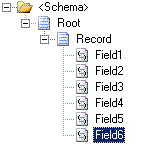
Make sure you have specified the correct child delimiters for the Root (0x0D 0x0A) node as well as the Record (,) node.

Root Node: Child Delimiter Type = Hexadecimal Child Delimiter = 0x0d 0x0a Child Order = Infix or Postfix

Record Node: Child Delimiter Type = Character Child Delimiter = , Child Order = Infix

Now select the Record node and set its MaxOccurs property to 1. This is actually the key to debatching. The flat file disassembler will automatically separate each record into individual message.

Important: If you have set the Child Order Property of the Root node to Infix, make sure you have also set the property ‘Allow Message Breakup At Infix Root‘ to Yes

Next, as you would normally do, add a receive pipeline to the project and add a flat file disassembler and set the Document schema property to the schema we created.

That’s all there is to it.

Now suppose you have a flat file that also has a header record or a trailer (footer) record or both as shown below.

FirstName,LastName,RegNo,School,City SubjectName1,Score1 SubjectName2,Score2 SubjectName3,Score3 SubjectName4,Score4 SubjectName5,Score5 SubjectName6,Score6 SubjectName7,Score7 SubjectName8,Score8 TotalScore

You would normally create a flat file schema as shown below to parse as one single message.
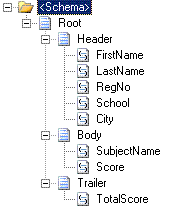
But for the purpose of debatching the body records, you need to create 3 separate schemas as shown below. Make sure the MaxOccurs of the Body record is set to 1.
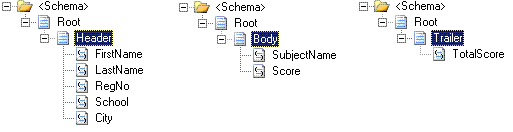
And in the flat file disassembler, you need to set the Header schema, Document schema and Trailer schema properties appropriately.

Note: You might need to set a unique Tag Identifier property for each of the schemas, and also prefix the same tag identifier on the records as shown below, so that the flat file parser can distinguish the header, body and footer records.

HFirstName,LastName,RegNo,School,City BSubjectName1,Score1 BSubjectName2,Score2 BSubjectName3,Score3 BSubjectName4,Score4 BSubjectName5,Score5 BSubjectName6,Score6 BSubjectName7,Score7 BSubjectName8,Score8 FTotalScore

It is possible to preserve the header record into the message context, by setting the Preserve header property of the flat file disassembler to true, so that you can use it as a header record for each of the debatched message.

To use the preserved header, you need to set the Header schema property of the flat file assembler to the same header schema you used in the disassembler. Here’s how the output will look.

HFirstName,LastName,RegNo,School,City BSubjectName1,Score1

HFirstName,LastName,RegNo,School,City BSubjectName2,Score2

HFirstName,LastName,RegNo,School,City BSubjectName3,Score3

HFirstName,LastName,RegNo,School,City BSubjectName4,Score4

HFirstName,LastName,RegNo,School,City BSubjectName5,Score5

HFirstName,LastName,RegNo,School,City BSubjectName6,Score6

HFirstName,LastName,RegNo,School,City BSubjectName7,Score7

HFirstName,LastName,RegNo,School,City BSubjectName8,Score8

Filtering records using Maps and conditional looping

Quite often you come across situations in BizTalk, where you receive a message that contains hundreds of records, when you are actually interested only in a subset of those records that match a certain criteria and want to create a message that contains only the relevant records.

There are numerous ways of doing it such as:

  • Debatch and Aggregate (Scatter-Gather Pattern)
  • Using xslt in maps
  • Using xpath in orchestration
  • Using an external component

There is also another simple and straightforward way of doing it using BizTalk maps known as conditional looping, which you will see in a moment.

Let me illustrate this using an example. Assume that you receive a Customer message that contains all your customers. However, your requirement is a Customer message that contains only those customers who match the following criteria:

City = ‘New York’
Rating = ‘High’

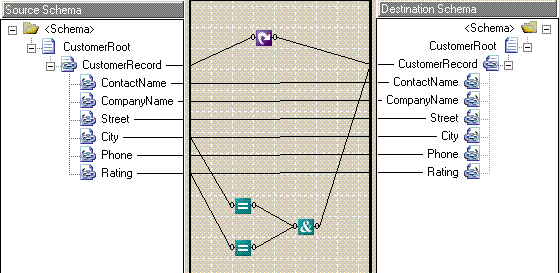
A simple map shown below will do the trick.

When the outputs of a Looping functoid in conjunction with any of the Logical functoids are connected to the same target node, the behavior is as follows:

  • If the output of the logical functoid is false, the looping functoid will suppress the creation of the target node.
  • If the output of the logical functoid is true, the looping functoid allows the creation of the target node.

The Equal functoids here return true, if the values from the respective nodes match the configured value (hardcoded inside the functoid). we then connect the output of both the Equal functoids to a Logical AND functoid, so that the final output is true only if both the Equal functoids are true.

This way you can actually add more conditions by using any combination of Logical fuinctoids available in BizTalk.